From log.dll To A Decrypted Chrysalis Main Module
End-to-end offline unpacking of the Lotus Blossom Chrysalis backdoor chain, from DLL sideloading through shellcode extraction, region decryption, and RC4 config recovery, without a live Windows debugger.

This sample caught my attention because it looked like a perfect candidate for a question I keep coming back to: how far can you get with offline, reproducible unpacking before you ever need a live debugger? The Lotus Blossom “Chrysalis” chain that Rapid7 described in February 2026 has multiple layered stages, exception-driven control flow, and a reflective implant, exactly the kind of thing that usually forces analysts into fragile, one-off debugging sessions. I wanted to see if I could turn the whole thing into a deterministic pipeline that another analyst could rerun on a different machine and still recover the same bytes, hashes, and reversing pivots.
The goal was evidence-centered outputs at every checkpoint. Instead of relying on “it ran in my debugger,” each stage produces artifacts with verifiable hashes and structured diffs that are ready for peer review or handoff.
Summary and Attribution
This project started as a practical engineering exercise: can we turn a strong threat-intel write-up into a reproducible unpacking pipeline with auditable outputs? Rapid7 already established the family behavior and high-level chain, so the work here focused on implementation discipline, verification, and handoff quality for other reverse engineers.
Primary upstream research and malware-family analysis credit goes to Rapid7:
This post focuses on reproducibility and analyst workflow:
- deterministic offline extraction on macOS/Linux
- scriptable unpacking and config decryption
- SQLite/CFG diff generation for reverse engineering handoff
The constraints are practical:
- The loader and payload are x86 Windows artifacts.
- The analysis environment is an ARM Mac.
- We still want deterministic outputs we can reverse in Ghidra/IDA and share as hashes/artifacts.
Quick Primer (For Less Technical Readers)
If you are newer to malware analysis, these terms help decode the rest of this article:
- DLL sideloading: A trusted application loads a malicious DLL from the same folder, so bad code runs under a normal-looking process.
- Stage / payload: Malware often arrives in layers. One layer decrypts and launches the next.
- Emulation: Running code in a simulated CPU/memory environment instead of executing it directly on your operating system.
- PE file: The standard Windows executable format (
.exe,.dll). - Hash (SHA-256): A content fingerprint used to verify files are exactly the same.
- RVA/VA: Addressing terms used in reversing. RVA is an offset inside a module; VA is the absolute runtime address.
- Diff report: A comparison of “before vs after” bytes/code, used to prove exactly what changed.
If you only want the high-level story, read: Execution Chain -> Why Emulation -> Step 1/2/3 -> Conclusion. The deeper IDA/assembly sections are there for specialist validation.
Stage map (at a glance) Stage0:
BluetoothService.exesideloadslog.dll;LogWriteperforms loader-side shellcode decrypt + handoff. Stage1: shellcode runs as a non-PE loader and applies the"gQ2JR&9;"region transform for main-module recovery. Stage2: recovered main module is analyzed as patched PE / memory image artifacts. Config: RC4 decrypt fromBluetoothServiceblob using reported offset/size/key for this sample.
Downloads
Everything referenced in this article is grouped so readers can either consume the write-up quickly or pull the exact scripts and reports needed to reproduce one section at a time. The goal is to keep this useful as both a narrative report and a working analysis kit.
Source and tooling bundles
- Bundle index: Open
- Scripts/emulators bundle: Folder
- IDA automation scripts: Folder
- Notebooks bundle: Folder
- Input sample hash manifest (no binaries): Folder
- DB diff CSV reports: Folder
- Binary diff results: Folder
- Pipeline flowchart assets: Folder
Direct files often requested
run_chrysalis_pipeline.py: downloademulate_logwrite_dump_shellcode.py: downloadoffline_extract_stage2.py: downloadrender_cfg_diff_html.py: downloadsqlite_diff_report.py: downloadpatched_diff.txt: downloadpatched_diff.json: downloadchrysalis_unpacking_walkthrough.ipynb: downloadinput_sha256.csv(input verification manifest): download
File Hashes (Inputs and Produced Artifacts)
The hash table is the trust boundary for the whole report. If a reader cannot match these values, they should assume they are on a different sample, a different transformation path, or a broken environment and stop before drawing conclusions.
All hashes below are SHA-256 values from the workflow run referenced in this report.
| Artifact | Role | SHA-256 | Download |
|---|---|---|---|
input/log.dll | Input sample | 3bdc4c0637591533f1d4198a72a33426c01f69bd2e15ceee547866f65e26b7ad | Not redistributed |
input/BluetoothService.exe | Input sample | 2da00de67720f5f13b17e9d985fe70f10f153da60c9ab1086fe58f069a156924 | Not redistributed |
input/encrypted_shellcode.bin | Input sample | 77bfea78def679aa1117f569a35e8fd1542df21f7e00e27f192c907e61d63a2e | Not redistributed |
output/shellcode.bin | Produced (stage1 dump) | 4416729d92e22ccb93e26c6896efe056b851a914727969f0ff604da4ef18ccfa | Not redistributed (malware-derived) |
output/shellcode_full.bin | Produced (full stage1 region) | 83f17d256d010ebfec8d58c4217f54a73d8237aa51ebab75c3e50f111d883d49 | Not redistributed (malware-derived) |
output/main_module_patched.exe | Produced (patched module) | bd0fb50084a21876fdbcf33fc7cf1949b78020f9e169086b2dd0b6aae28ad359 | Not redistributed (malware-derived) |
output/main_module_mem.bin | Produced (memory image) | 129a91eaa5e03b112ecfccd858b8c7fc4f482158a53d8300f2505d7c120f87d3 | Not redistributed (malware-derived) |
output/config_decrypted.bin | Produced (decrypted config blob) | aad018195c5ee6c2e3c00bc3c95313cb4301218534765472124ebc7b5fb7bcb1 | Not redistributed |
output/patched_diff.json | Produced report | a5fdfdebfd367cabae0c41fa91846a6f54d585fa0090f86d8db0d4cd84facf4f | download |
output/patched_diff.txt | Produced report | b462aa52be01625c72965b3b99c2ef37ccc64e834e4fd9cba624a0e6a6c1f5f7 | download |
What You Get At The End
The output set is designed around common reverse-engineering handoff needs: one artifact for static diffing, one for memory-oriented analysis, and one for direct config extraction. This reduces back-and-forth when multiple analysts split tasks across tooling.
By the end of this workflow you will have:
- A dumped stage1 buffer (
shellcode.bin) and the full stage1 executable region (shellcode_full.bin). - A decrypted “main module”:
- as a patched container on disk (
main_module_patched.exe) - and optionally as a clean in-memory image (
main_module_mem.bin)
- as a patched container on disk (
- A decrypted configuration blob (
config_decrypted.bin) with the C2 and other fields Rapid7 described.
And importantly:
- A repeatable pipeline that does not rely on “it ran in my debugger”.
Artifacts
The original bundle structure matters because the entire chain depends on realistic file relationships: the sideload container, the malicious DLL, and the encrypted blob are not independent samples. Preserving that context avoids false assumptions when reproducing loader behavior.
The Rapid7 update.exe bundle we worked from contains:
log.dll(malicious sideloaded DLL)BluetoothService.exe(renamed Bitdefender Submission Wizard used as the sideload container)BluetoothService(encrypted blob; we store asencrypted_shellcode.bin)
Rapid7 hashes (and what we observed locally):
log.dllsha2563bdc4c0637591533f1d4198a72a33426c01f69bd2e15ceee547866f65e26b7adBluetoothService.exesha2562da00de67720f5f13b17e9d985fe70f10f153da60c9ab1086fe58f069a156924BluetoothService/encrypted_shellcode.binsha25677bfea78def679aa1117f569a35e8fd1542df21f7e00e27f192c907e61d63a2e
Execution Chain (Condensed)
This is the short operational story behind the unpacking work: sideloaded loader, staged decrypt, reflective execution, then config recovery. We keep it condensed here so each deeper section can map back to a single stage boundary.
BluetoothService.exeloadslog.dllvia DLL sideloading and calls two exports:LogInit: loads the encrypted blob into memory.LogWrite: resolves APIs via hashing, performs loader-side runtime shellcode decryption (Rapid7 describes this as a custom path with LCG-related constants), marks memory executable, and jumps to shellcode with a 25-dword argument structure (Rapid7).
- The decrypted blob (stage1) is not a PE. It is a loader-like shellcode that:
- Decrypts the next module layer using the
"gQ2JR&9;"add/xor/sub transform over 5 regions, as reported by Rapid7 (Rapid7). - Resolves APIs again and transfers execution to the “main module”.
- Decrypts the next module layer using the
- The main module behaves like a reflective PE-like implant (“Chrysalis”), performs CRT init, then executes its main logic.
- The implant decrypts configuration data stored in the
BluetoothServiceblob using RC4.
Why Emulation (And What Not To Emulate)
The key design choice was to emulate only the part that gives high signal with low instability. Trying to fully emulate hostile stage1 code on a constrained analysis host burns time quickly and produces brittle results, while extracting clean bytes at the handoff boundary gives deterministic progress.
In plain terms: we used emulation as a controlled extraction tool, not as a perfect “run the malware end-to-end” substitute. That decision kept the workflow stable and reproducible for people who are not building a full Windows runtime from scratch.
The first stage (log.dll) is a good fit for emulation:
- It is normal PE code.
- It calls a predictable set of WinAPI functions (heap + virtual memory).
- We can stub the APIs well enough to reach the “decrypted buffer is ready” breakpoint.
Stage1 execution is much less friendly:
- It uses exception-driven control flow and odd instructions (port I/O, segment ops,
retf, etc.). - A naive emulator tends to crash or spin in anti-emulation loops.
Instead of forcing stage1 to “run” perfectly, we use emulation only to extract the decrypted bytes and then apply the remaining transforms offline.
SEH/VEH And “Debugger Problems” (How We Handled Them)
Early attempts that treated exceptions as regular crashes produced misleading dead ends. Reframing those faults as intentional control-flow mechanics changed the strategy from “make everything execute” to “capture stable state at the right boundary and continue offline.”
Stage1’s behavior is consistent with SEH/VEH-driven loaders: code that intentionally faults and expects an exception handler to redirect execution. In a normal Windows debug session, those exceptions become “control flow”. In a basic emulator, they become crashes or infinite loops.
What these terms mean:
- SEH (Structured Exception Handling): Windows’ built-in, stack-based exception system. When code hits an error (for example invalid memory access), execution can be redirected to a registered handler instead of just terminating.
- VEH (Vectored Exception Handling): A process-wide callback chain for exceptions that can run before regular SEH handlers. Malware often uses VEH because it gives centralized control over fault behavior.
Why this causes issues in analysis tools:
- Malware can intentionally trigger faults (bad reads, invalid instructions, divide-by-zero) as part of normal logic.
- A debugger or emulator may treat those as “something broke” and pause/abort, while malware expects the handler to catch them and continue.
- If your environment does not reproduce Windows exception ordering (first-chance vs second-chance, VEH before/after SEH, handler return semantics), control flow diverges quickly.
- The result is common: loops, fake dead ends, wrong branch paths, or crashes that are not real crashes in the malware’s intended runtime.
Non-technical analogy: SEH/VEH are like emergency detour routes in a city. The malware sometimes drives into a “closed road” on purpose because it expects the detour signs to route it to the next checkpoint. If your map app does not understand those detours, it reports a dead end even though a valid route exists.
We did not implement a full Windows SEH/VEH dispatcher in Unicorn.
What we did instead:
- Avoided needing stage1 to execute correctly by dumping its decrypted bytes at the
log.dllbreakpoint and continuing offline. - Added a few surgical mitigations to keep emulation from failing too early during
log.dll/handoff work:- map the NULL page and plant a minimal
MZ/PE\0\0structure (prevents common “base==0” PE-header reads from faulting), - Capstone-assisted decoding for diagnostics and targeted register fixups in specific patterns,
- optional “skip lists” for a small set of stage1 junk instructions when experimenting (port I/O, segment ops, etc.).
- map the NULL page and plant a minimal
The key takeaway: we didn’t “beat” VEH by perfectly emulating it; we sidestepped it by extracting bytes at stable boundaries and applying the remaining transforms offline.
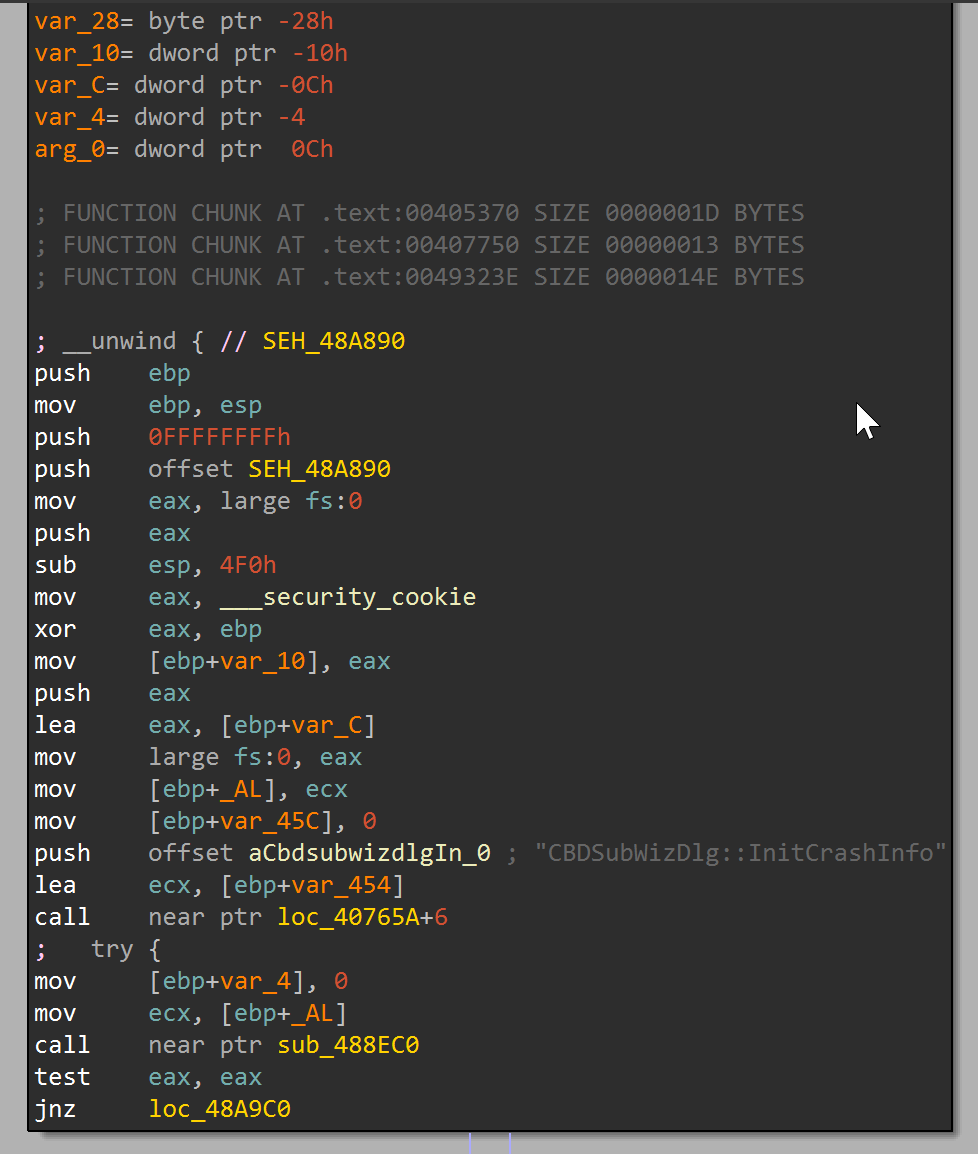 SEH prologue evidence at
 0x48A890 showing handler registration (fs:[0]) and guard-frame setup before protected logic.
Tooling Overview
The toolkit is intentionally split into narrow scripts rather than one opaque monolith. That keeps each stage testable, makes failure modes easier to isolate, and lets analysts replace only the piece they need for a variant sample.
We built a small toolkit:
emulate_logwrite_dump_shellcode.py:- Unicorn x86 emulation for the
log.dll!LogWritepath. - Minimal API stubs (
HeapAlloc/Free/ReAlloc/Size,VirtualAlloc/Protect, etc.). - Dumps stage1 bytes at the decryption breakpoint.
- Unicorn x86 emulation for the
offline_extract_stage2.py:- Applies Rapid7’s
"gQ2JR&9;"per-byte transform over the 5 regions described by the stage1 argument struct (Rapid7). - Can output a patched PE on disk or a reconstructed memory image.
- Applies Rapid7’s
decrypt_btservice_config.py:- RC4-decrypts the config at offset
0x30808size0x980with keyqwhvb^435h&*7(Rapid7).
- RC4-decrypts the config at offset
api_hash_rainbow.py(Windows):- Builds a rainbow table for the loader/log.dll API hashing described by Rapid7.
- This is useful when reversing
log.dll(and similar loader components) because it maps a 32-bit “API hash” back to a likely(dll, export)pair. - Note: Rapid7 also describes a separate, more complex API hashing routine in the decrypted main module; that would be a different tool/implementation.
ida_chrysalis_api_hash_resolver.py:- Standalone IDAPython automation for
log.dll. - Builds a local rainbow from Windows DLL exports, resolves resolver constants, and applies enum symbols/comments so disassembly and decompiler show API names instead of raw hex.
- Standalone IDAPython automation for
ida_main_module_triage.py:- Standalone IDAPython automation for
main_module_patched.exe/main_module_mem.bin. - Applies command-tag enum labels (
4T..4d) and can mark patched ranges from JSON output so analysis focuses on malicious regions first.
- Standalone IDAPython automation for
ida_config_path_mapper.py:- Standalone IDAPython config-path triage for patched/memory module views.
- Scores likely config-decryption functions using immediate/string markers and can export a CSV report.
ida_c2_dispatch_lifter.py:- Standalone IDAPython dispatch extractor for command tags (
4T..4d). - Ranks likely dispatcher functions and exports a handler-reference table (CSV).
- Standalone IDAPython dispatch extractor for command tags (
ida_hash_table_apply.py:- Standalone IDAPython hash annotator that ingests nested rainbow JSON and replaces matching immediate constants with enum/comments at scale.
Step 1: Unicorn Emulation Of log.dll!LogWrite
Step 1 is where we establish controlled execution and collect the first high-value artifact. The objective is not full behavioral emulation; the objective is to stop at a known good point where decrypted stage1 bytes are observable and dumpable.
We map log.dll at its expected image base (0x10000000, sample-specific) and set a breakpoint at:
RVA 0x1C11(VA0x10001C11, sample-specific)
At the breakpoint, EAX points to the decrypted stage1 buffer. We dump:
- The “reported” stage1 length (201,096 bytes /
0x31188in this sample) - The full 2MB region (
0x200000in this sample, sample-specific) that the malware marks executable viaVirtualProtect
Outputs:
shellcode.bin(stage1)shellcode_full.bin(stage1 full region)
Why the full 2MB dump matters:
- The stage1 code references data past the initial “payload length”.
- Later offline extraction becomes easier when we keep the whole protected region.
This decision came from debugging pain: “minimal” dumps looked valid but later failed in secondary transforms because required data tails were missing. Capturing the entire protected region removed that ambiguity.
What We Validate Here
At this point we want the following to be true:
- Our
input/hashes match Rapid7 (so we know we are working on the same sample family). - The emulator hits the breakpoint (
0x10001C11) and printsEAX=...pointing into a mapped buffer. - For the sample matching Rapid7’s published hashes/indicators, the observed reported length at the breakpoint was
0x31188. - In this sample,
shellcode_full.binlength is0x200000.
If these do not hold, stop and fix stage0 first (bad input file, wrong image base, missing stub, etc.).
Step 2: Offline Main-Module Decryption (“gQ2JR&9;”)
Step 2 converts a dynamic reversing problem into a deterministic byte transform problem. Once we have stable stage1 outputs and argument metadata, we can reconstruct the next stage without depending on fragile runtime control flow.
Important stage boundary: this section covers the later stage1 region transform used for main-module recovery. It is distinct from the loader-side log.dll!LogWrite runtime shellcode decryption phase described above.
Rapid7 provides the bytewise transform for this later phase (Rapid7):
1
2
3
4
5
6
BYTE k = XORKey[counter & 7];
BYTE x = encrypted[pos];
x = x + k;
x = x ^ k;
x = x - k;
decrypted[pos] = x;
Rapid7 also notes this transform is applied 5 times (Rapid7). In this workflow, that maps to applying the routine across 5 region descriptors, not repeatedly reprocessing one contiguous byte range.
Two key observations that make offline work reliable:
- The 25-dword argument structure passed to stage1 includes the region RVAs and sizes.
- The transform is self-inverse per byte (apply it twice to the same byte with the same key context and you recover the original), which is why the same routine can serve encryption/decryption roles when region boundaries and ordering are preserved.
In simple terms, this transform behaves like a reversible scramble. If the malware scrambles and unscrambles in a predictable way, we can reproduce that behavior offline and validate it with byte-level diffs.
In our sample (sample-specific), the region list is:
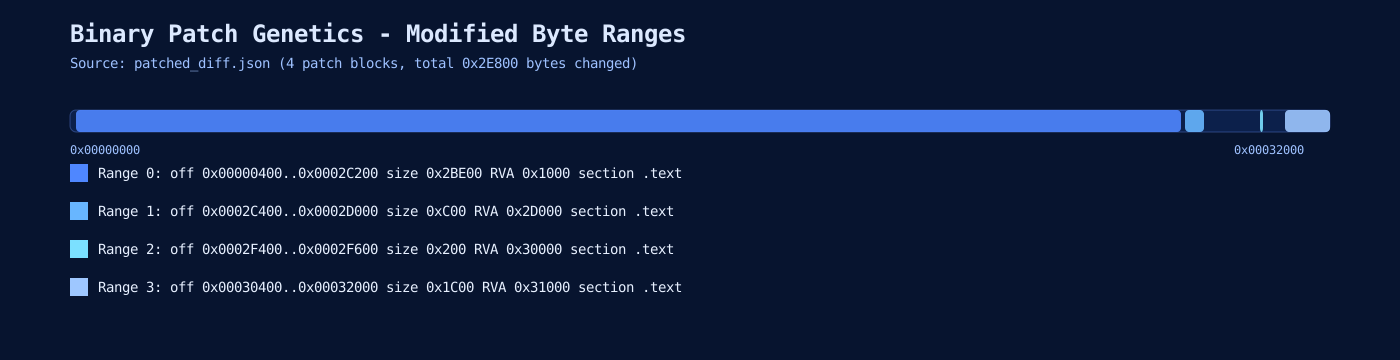
- RVAs:
0x1000, 0x24000, 0x2D000, 0x30000, 0x31000 - Sizes:
0x23000, 0x8E00, 0xC00, 0x200, 0x1C00 - Total modified bytes:
0x2E800
We implement an offline decryptor that can:
- Patch a PE on disk (
BluetoothService.exe) in-place to produce a “decrypted” container (main_module_patched.exe) - Build a decrypted in-memory image (
main_module_mem.bin)
The patched PE is a reconstruction/analysis artifact for reversing and diffing, not a claim about the exact on-disk payload dropped during runtime.
Producing both artifacts is intentional: file-backed tools and memory-oriented reversing tools answer different questions, and analysts usually need both views during triage.
Important note about signatures:
- VirusTotal will report the patched PE as “signed” + “invalid signature”.
- That’s expected: the container was signed, and we modified it.
Why A “Patched PE” Is Still Useful
Even though main_module_patched.exe remains the Bitdefender container, it is a practical bridge artifact:
- You can point standard PE tooling at it (imports, entrypoint, sections).
- You can confirm the decrypted regions line up with a PE-like layout.
- You can diff it against the original and confirm that exactly
0x2E800bytes changed.
For deeper reversing, the cleaner artifact is the reconstructed memory image (main_module_mem.bin), because it avoids file-offset vs RVA confusion when the malware expects an in-memory view.
Step 3: RC4 Config Decryption (Matches Rapid7’s reported offset/size/key for this sample)
Config extraction is sequenced after module recovery so the offset/size interpretation can be validated against the same staged context. Doing it in this order reduces the risk of treating copied indicators as independently discovered facts.
Rapid7 describes the config location (Rapid7):
- Stored in
BluetoothServiceblob - Offset
0x30808, size0x980(sample-specific / variant-dependent) - RC4 key
qwhvb^435h&*7(sample-specific / variant-dependent)
We decrypt it offline and confirm plaintext fields match:
https://api[.]skycloudcenter[.]com/a/chat/s/{GUID}- module name
BluetoothService - Chrome user-agent string
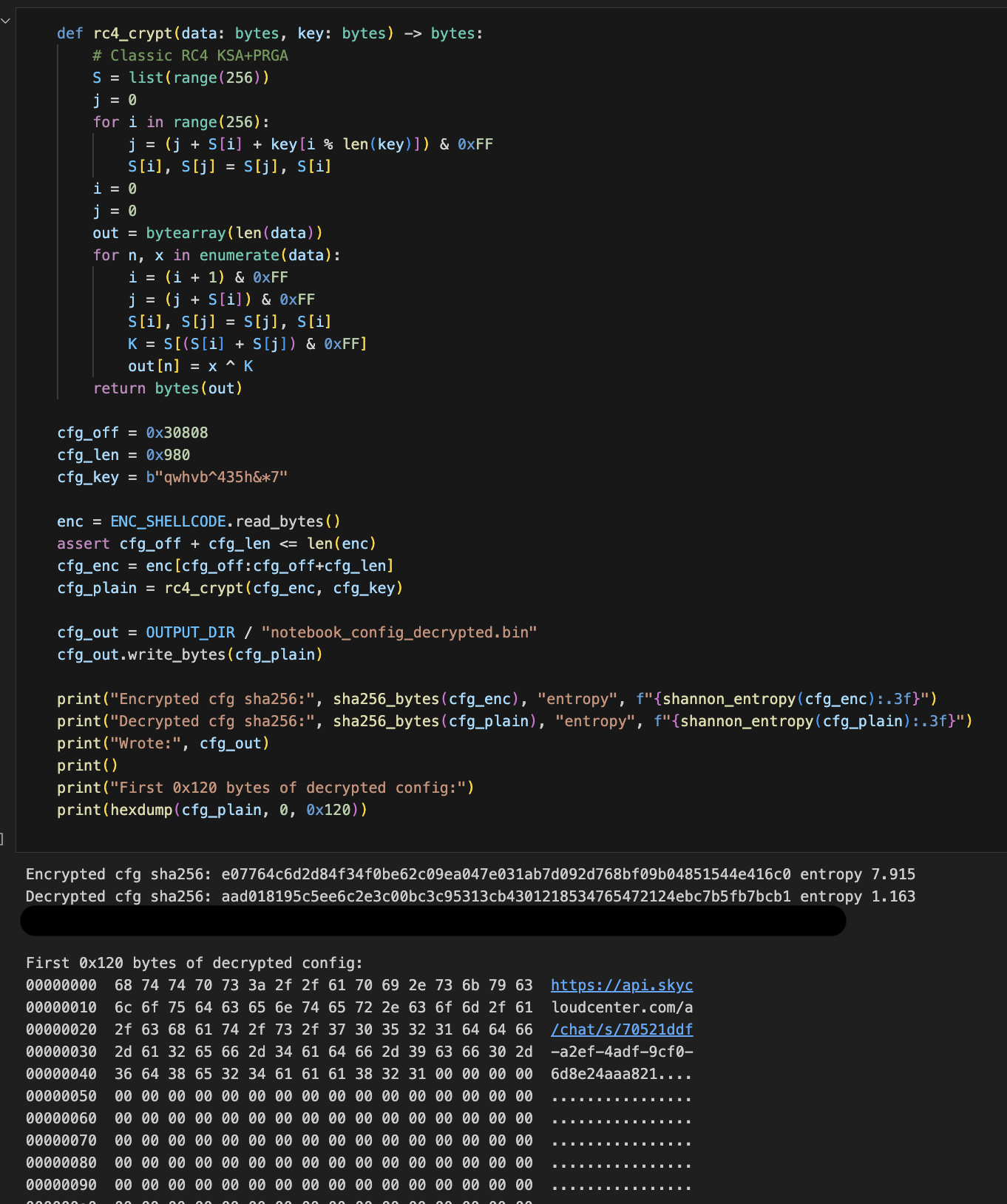 RC4 decryption proof: KSA/PRGA routine,
 0x30808/0x980 extraction, matching decrypted SHA-256, and plaintext config preview including C2 path/UA context.
Validating The “Main Module” Looks Real
Validation here is about avoiding false positives. A blob can decrypt and still be structurally wrong; checking imports, entrypoint shape, and CRT-like startup behavior gives confidence that we recovered executable logic and not partial noise.
Once the decrypted bytes are in place, the PE behaves like a normal x86 user-mode program:
- PE header is intact
- Import directory is populated (kernel32/user32/advapi32/ole32/wininet/etc)
- The entrypoint resembles MSVC CRT scaffolding
This is consistent with Rapid7’s statement that the module “executes the MSVC CRT initialization sequence” before transferring control to main.
Loader API Hashing (What api_hash_rainbow.py Models)
Hash-resolved imports are one of the biggest readability blockers in loader analysis. This section explains why we modeled the loader hash path directly: replacing opaque immediates with likely API names accelerates every downstream review step.
Rapid7 describes log.dll as resolving APIs via a hashing subroutine instead of importing everything by name. At a high level, the loader:
- Enumerates exports of a target DLL (or a module it has already loaded).
- Hashes each export name with:
- FNV-1a (seed
0x811C9DC5, prime0x01000193; sample-specific constants here) - followed by a MurmurHash-style avalanche finalizer
- FNV-1a (seed
- Applies a salted comparison against a hardcoded target hash.
Why a “rainbow table” helps:
- Once you know a target 32-bit hash value, you can brute-force which common WinAPI export name likely produced it (across
C:\Windows\System32\*.dll). - This converts “opaque numbers in disassembly” back into recognizable APIs like
VirtualProtect,GetProcAddress, etc.
Practical caveats:
- The exact salting and name normalization (e.g., case folding) can vary by sample. That’s why
api_hash_rainbow.pyexposes knobs:- export-name case (
asis/lower/upper) - salt operation (
xor/add/sub) and whether it’s applied pre/post finalizer - whether the avalanche finalizer is enabled
- export-name case (
Main-module hashing is different:
- Rapid7 also describes a second hashing routine used in the decrypted main module that walks the PEB and mixes API names in 4-byte blocks with additional rotations/multiplications.
- That is not the same as the loader hash above, and would need a separate implementation to generate an accurate rainbow table for main-module-only hashes.
IDA Automation That Removed Manual Busywork
Manual annotation works for one function, but it does not scale when the same patterns appear across hundreds of callsites. The IDA scripts were written to remove repetitive analyst effort and preserve consistent naming/comments across re-analysis sessions.
Two practical IDA workflows were automated:
- Loader hash resolution in
log.dll(ida_chrysalis_api_hash_resolver.py)- Input:
log.dllopened in IDA- Windows export directories (
C:\Windows\SysWOW64;C:\Windows\System32) - resolver EA (
0x100014E0in this sample, sample-specific) - seed (
0x114DDB33in this sample, sample-specific)
- Output:
- Enum-applied immediate operands at resolver callsites
- Comments such as:
APIHASH 0x47C204CA -> KERNEL32.dll!VirtualProtect- Result: - constants in disassembly/decompiler become readable API symbols, which is faster than one-off manual comments.
- Input:
- Main-module triage in patched/memory artifacts (
ida_main_module_triage.py)- Input:
main_module_patched.exeormain_module_mem.binopened in IDA- optional patched-range JSON from
diff_patched_pe.py
- Output:
- command-tag enum labels for the C2 dispatch values (
4T..4d) - optional colored/annotated patched ranges to prioritize likely malicious logic
- command-tag enum labels for the C2 dispatch values (
- Result:
- faster navigation in large mixed binaries (legit container code + injected/decrypted regions).
- Input:
- Config-path mapper (
ida_config_path_mapper.py)- Input:
- patched or memory module in IDA
- Output:
- comments/highlights for constants and strings tied to config path (
0x980,0x30808, and related xrefs; sample-specific / variant-dependent) - import-xref hits for config-path APIs (
CreateFileW,ReadFile,SetFilePointerEx, etc.) - ranked candidate functions and optional CSV export
- comments/highlights for constants and strings tied to config path (
- Notes:
- if the first pass returns zero hits (common when IDA marks all segments executable), the script retries on all segments automatically
- you can provide extra marker DWORDs on prompt (for this family,
0x2C5D0and0x116A7are practical anchors)
- Result:
- faster handoff from broad triage to concrete RC4/config parsing functions.
- Input:
- C2 dispatch lifter (
ida_c2_dispatch_lifter.py)- Input:
- patched or memory module in IDA
- Output:
- enum/comment applied tag references for
4T..4d - dispatcher candidate ranking by unique tag coverage
- optional CSV for writeups
- enum/comment applied tag references for
- Result:
- deterministic command-handler mapping instead of manual grep through decompiler output.
- Input:
- Bulk hash annotation from JSON (
ida_hash_table_apply.py)- Input:
- nested hash JSON (
DLL -> hash -> export) - IDA database with immediate hash constants
- nested hash JSON (
- Output:
- hash constants converted to readable comments/enums at matched sites
- Result:
- quick cleanup of “opaque constant” surfaces in both disassembly and pseudocode.
- Input:
- LogWrite/decrypt decompiler reconstruction (
ida_rebuild_logwrite.py)- Input:
log.dllin IDA- function anchors around
LogWrite(0x10001B20) andmw_decrypt(0x10001640)
- Output:
- typed/renamed
LogWritepseudocode (VirtualProtectpointer + stage1 arg struct) - explicit no-arg
mw_decryptprototype at callsite - helper-function naming + key-block comments inside
mw_decrypt(seed expansion, 0x20-byte schedule, transform, copy-back)
- typed/renamed
- Result:
- decompiler output becomes stable enough to map directly to assembly and to the offline Python implementation.
- Input:
Decompiler pitfall worth calling out:
mw_decryptuses a nonstandard prologue/SEH setup and reads caller context from stack internals.- Hex-Rays may invent a pseudo variable (for example
savedregs_anchor) and treat it like a normal argument. - In this sample, assembly shows
call mw_decryptwith no pushes fromLogWrite, so the correct function boundary model isvoid __cdecl mw_decrypt(void)for decompilation purposes.
Troubleshooting (The Stuff That Actually Breaks)
This section exists because most time was spent on edge-case breakage, not on the “happy path.” Documenting failure signatures and fixes makes the workflow practical for someone who was not present during initial experimentation.
These are the common failure modes we hit while iterating:
- Emulation crashes early with reads from
0x0000003Cor other low addresses. Fix:- Map the NULL page and place a minimal DOS+PE signature there (so “base==0” reads don’t fault immediately).
- Breakpoint not reached / control flow returns to
0x41414141. Explanation:- That “fake RET” is a guardrail: the emulator used a sentinel return address so we can stop cleanly when the DLL returns. Fix:
- Ensure you are running the correct
--mode(logwrite), and that stubs are returning to the correct call sites.
- Stage1 disassembly looks like nonsense (
in,out,retf,int XX), or loops forever. Explanation:- Stage1 is intentionally hostile to simplistic emulation (exception-driven control flow and junk opcodes). Fix:
- Don’t brute force stage1 execution. Dump bytes and do the offline transforms instead (this is the core design of this workflow).
- VirusTotal says the patched PE is “invalid-signature”. Explanation:
- Authenticode signature verification fails after any byte modifications. Fix:
- None required; this is expected. Validate via diff-bytes and PE structure instead.
Assembly Walkthrough (Evidence Anchors)
This section is intended for the final published write-up where readers want to see concrete assembly context, not only script output.
The assembly snippets below are chosen as proof points: each one links a reversing claim to a concrete instruction pattern and a corresponding script action. If a reader can verify these anchors, they can trust the surrounding automation.
All absolute addresses in this section are sample-specific unless otherwise noted.
A) log.dll!LogWrite Handoff Boundary
Representative pattern around the stage1 boundary:
.text:10001B20 call    mw_decrypt
.text:10001B25 mov     eax, [g_decrypted_buf]
.text:10001B2A push    offset old_protect
.text:10001B2F push    40h
.text:10001B31 push    200000h
.text:10001B36 push    eax
.text:10001B37 call    ds:VirtualProtect
.text:10001B3D ...     ; build 25-dword struct
.text:10001B5E call    eax
Why this matters:
- This is the exact boundary where stage0 is still tractable and stage1 begins.
- It justifies extracting bytes at the breakpoint instead of emulating full stage1 behavior.
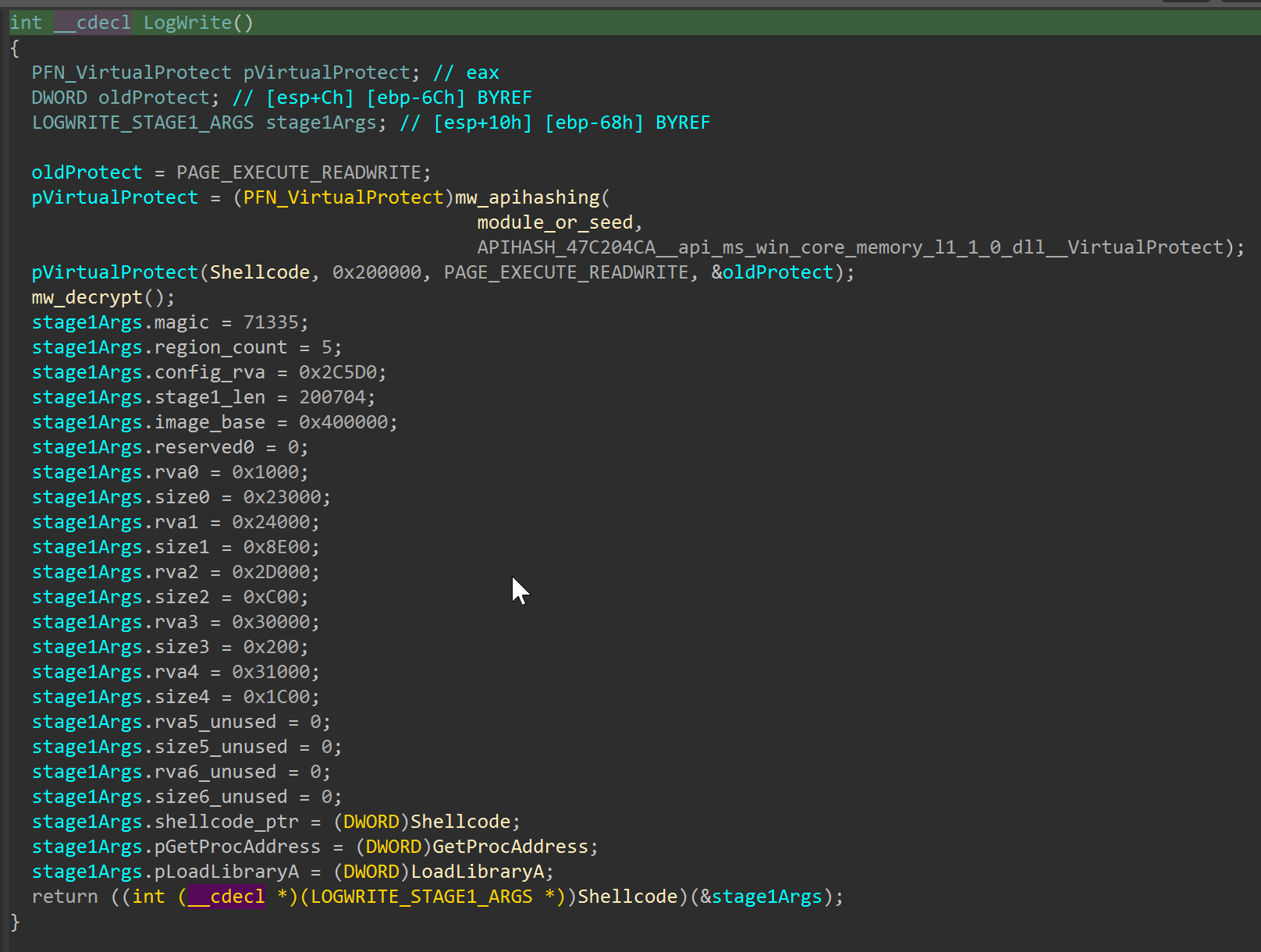
log.dll!LogWrite handoff boundary: decryption call, RWX transition, and stage1 argument-structure initialization before control transfer.
B) Stage1 Region Byte-Transform Core (gQ2JR&9;)
Representative byte loop behavior (matching the offline script):
movzx   ecx, byte ptr [esi+edi]   ; encrypted byte
movzx   eax, byte ptr [key+edi&7]
add     ecx, eax
xor     ecx, eax
sub     ecx, eax
mov     [esi+edi], cl
inc     edi
cmp     edi, region_size
jb      short decrypt_loop
Why this matters:
- It ties the reversing claim directly to the implemented transform in
offline_extract_stage2.py. - It reflects the later stage1-to-main-module transform phase, not the earlier
log.dll!LogWriteruntime shellcode decrypt boundary.
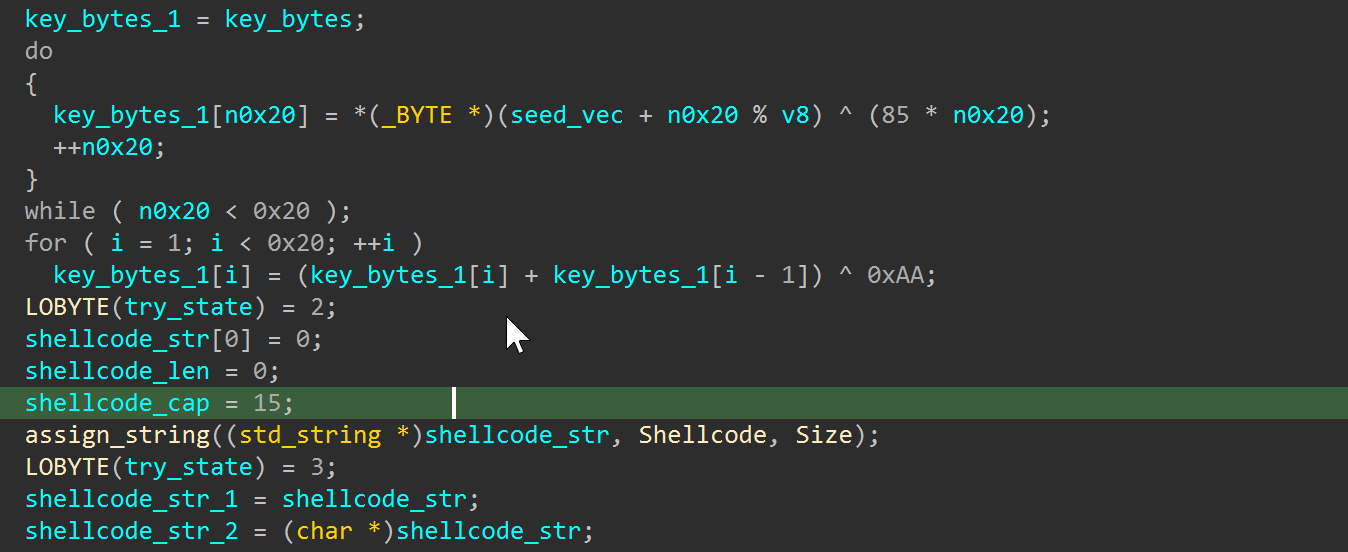 Stage1 region-transform core and key schedule logic used by the offline extractor implementation.
C) Stage1 Arg-Struct Region Mapping
The decryption loop depends on stage1-provided region metadata:
1
2
3
RVA list : 0x1000, 0x24000, 0x2D000, 0x30000, 0x31000
Size list: 0x23000, 0x8E00, 0x0C00, 0x0200, 0x1C00
Total    : 0x2E800 bytes
Why this matters:
- It explains why patched bytes are concentrated in specific ranges.
- It connects assembly/runtime state to
patched_diff.jsonoutput.
D) RC4 Config Decryption Path Fingerprint
Typical config path markers in the main module:
push    980h            ; size
push    30808h          ; offset
lea     ecx, [rc4_state]
call    rc4_ksa_prga
Why this matters:
- It anchors the static analysis to observable constants (
0x980,0x30808). - It demonstrates that config extraction was not guessed from strings alone.
E) Loader API Hash Resolution Callsite
Resolver pattern you want to show in the article:
push    47C204CAh       ; hash for VirtualProtect in this sample context
call    api_hash_resolver
mov     [ebp+virtualprotect_ptr], eax
Why this matters:
- It visually explains why the rainbow table and IDA enum/comment automation add immediate value.
- It helps readers connect opaque constants to concrete API behavior.
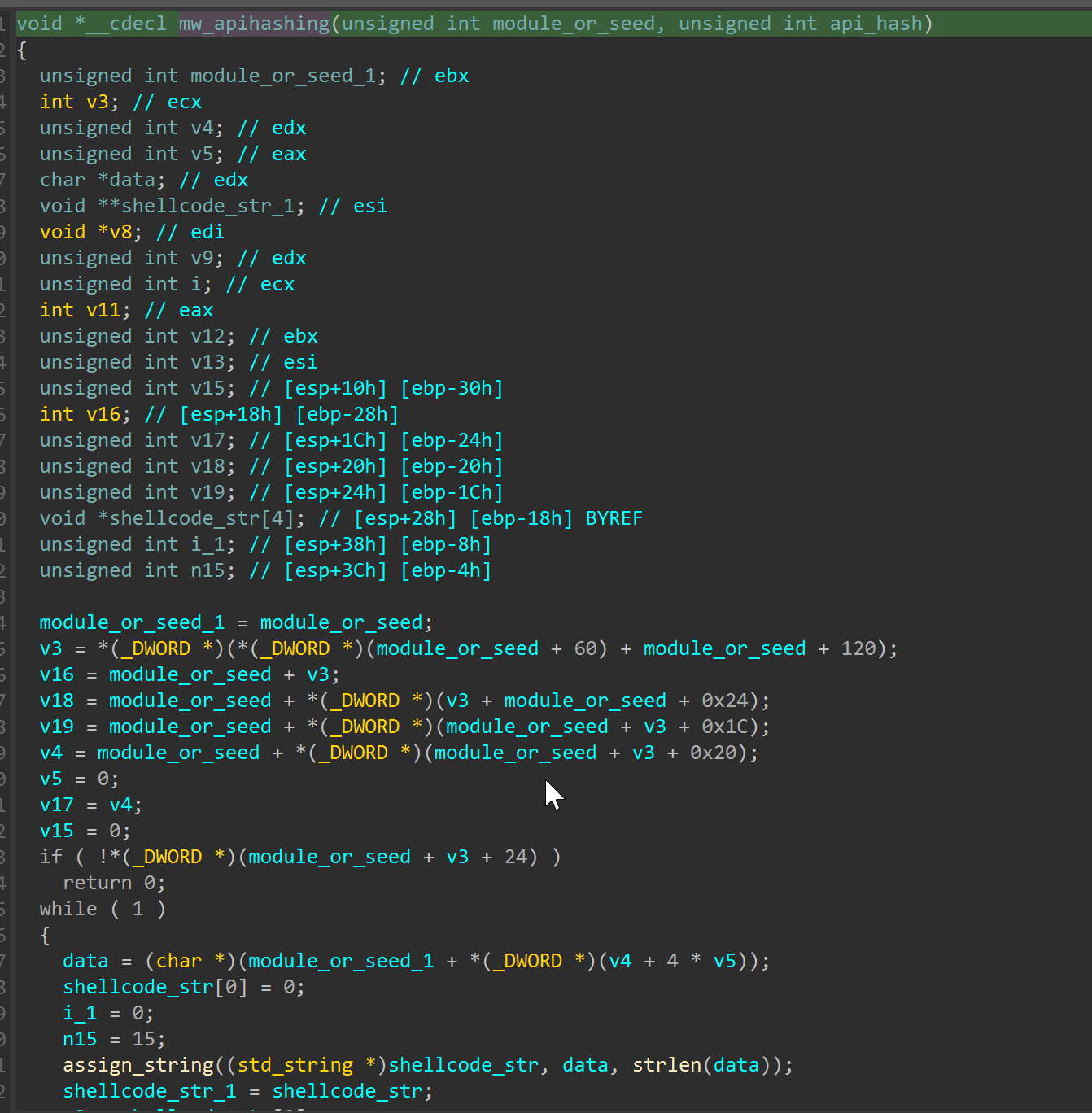
mw_apihashing resolver internals used to map 32-bit API hash constants to exported function names.
F) Memory-Protection Transition Before Stage Handoff
Representative pattern to capture at the end of loader preparation:
push    offset old_protect
push    40h              ; PAGE_EXECUTE_READWRITE
push    200000h          ; 2MB region
push    eax              ; decrypted stage1 base
call    ds:VirtualProtect
test    eax, eax
jz      short fail_path
Why this matters:
- It shows the exact point where decrypted bytes become executable.
- It is one of the clearest “stage boundary” markers in this chain.
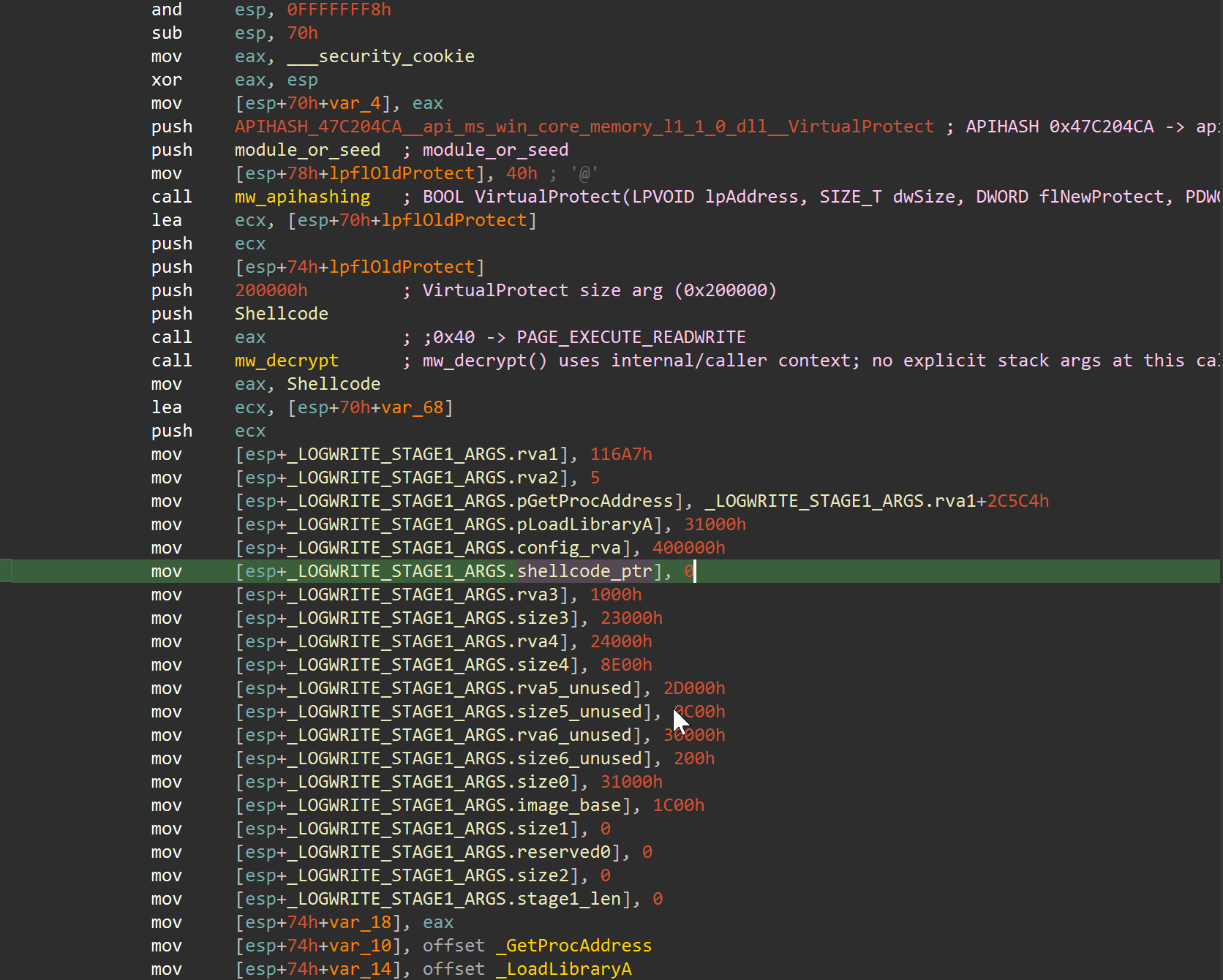 Callsite view showing
 APIHASH_47C204CA resolution, VirtualProtect(..., 0x200000, 0x40, ...), and immediate writes into the stage1 argument block.
G) RC4 Routine Shape (KSA/PRGA Fingerprint)
Representative RC4-like pattern to look for in config-decrypt logic (exact registers may vary):
xor     ecx, ecx               ; i = 0
loc_init:
mov     [state+ecx], cl        ; state[i] = i
inc     ecx
cmp     ecx, 100h
jb      short loc_init
...
; key scheduling / swaps
movzx   eax, byte ptr [state+ecx]
add     edx, eax
movzx   eax, byte ptr [key+...]
add     edx, eax
xchg    byte ptr [state+ecx], byte ptr [state+edx]
Why this matters:
- It demonstrates that config decryption is algorithmic and reproducible, not a guessed string extraction.
- It gives readers a visual anchor for validating RC4 path discovery in IDA.
H) Command Tag Dispatch Pattern In Main Module
Representative dispatcher shape for command tags (4T..4d family):
cmp     eax, TAG_4T           ; example symbolic tag
jz      loc_handle_4T
cmp     eax, TAG_4U           ; example symbolic tag
jz      loc_handle_4U
...
jmp     loc_default
Why this matters:
- It ties command-tag tables to concrete handler branches.
- It helps less technical readers understand “this tag selects this behavior” at a glance.
Flowchart (Pipeline Overview)
The flowchart is useful for onboarding: it gives a one-screen model of where emulation stops, where offline transforms begin, and where reporting artifacts are generated. This is especially helpful when handing work to teammates who only need one stage.
The diagram below reflects the current pipeline order in run_chrysalis_pipeline.py, including the SQLite diff reports and static-SVG CFG HTML generation stages.

Source DOT file (versioned in the public artifact repository):
https://github.com/taogoldi/analysis_data/blob/main/chrysalis_feb_2026/docs/pipeline_flowchart.dot
Render command (requires Graphviz dot):
1
2
3
python3 chrysalis_feb_2026/scripts/render_flowchart.py \
  --dot chrysalis_feb_2026/docs/pipeline_flowchart.dot \
  --out chrysalis_feb_2026/docs/pipeline_flowchart.png
If dot is not installed on macOS, install Graphviz (e.g. via Homebrew) and re-run the command.
Reproduction Commands
See README.md for the exact command lines and expected outputs.
When reproducing, run from a clean workspace and save terminal logs with timestamps. If outputs diverge, compare hashes stage-by-stage rather than jumping directly to final artifacts; this is faster for isolating the first failing boundary.
Genetics Matching (Patching Analysis)
This section summarizes patch “genetics”: which code regions changed, and how baseline instructions align against patched instructions in focused side-by-side slices. The goal is to provide visual evidence of transformation patterns without dumping full function listings inline.
Function matching and SQLite diff alignment in this section were produced with Diaphora. Credit to Joxean Koret and the Diaphora project for the diffing framework used in this workflow.
Patch Range Genome Map
The map below compresses all modified file-offset ranges from patched_diff.json into one timeline.
Side-By-Side Diff Slices (Focused)
These are compact slices extracted from asm_side_by_side_*.csv outputs (generated from the DB diff workflow). They are intentionally trimmed to representative instruction windows so readers can quickly compare baseline vs patched behavior.
Target file: main_module_patched.exe | Patch-range entry anchor offset: 0x00401000 | Evidence image: asm_H_patch_range_401000.png |
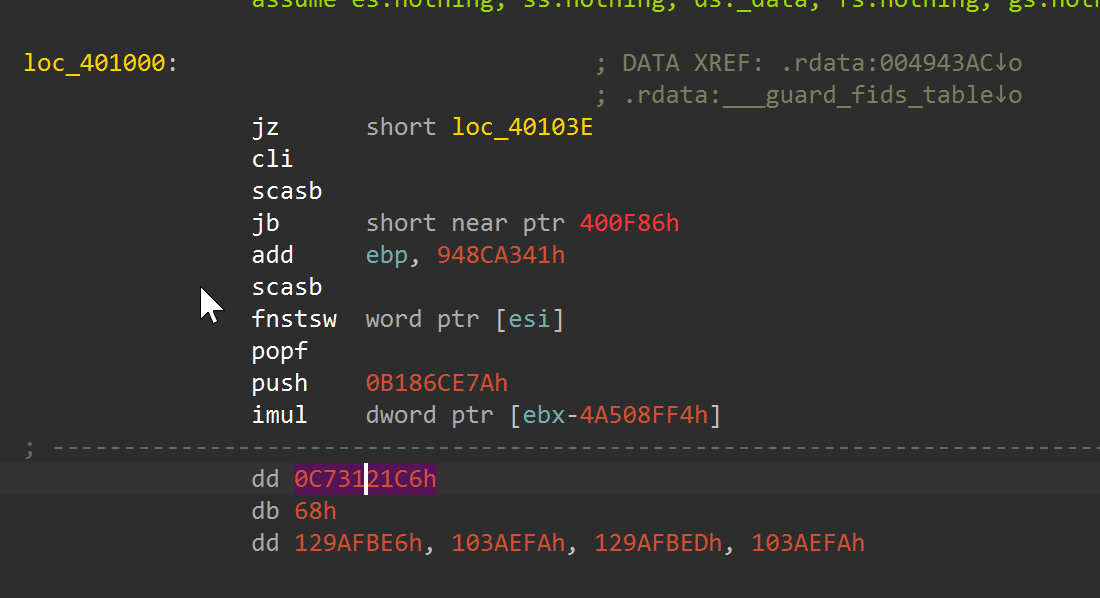 Disassembly anchor near
 loc_401000, used here as the first low-level entry point before the focused side-by-side slices.
Target file: main_module_patched.exe | Patched subroutine offset: 0x0043CD83 | Diff slice file: asm_side_by_side_0x0043CD83.csv Match status: Unmatched at line level (same_line=True: 0/2632 rows in asm_side_by_side_0x0043CD83.csv).
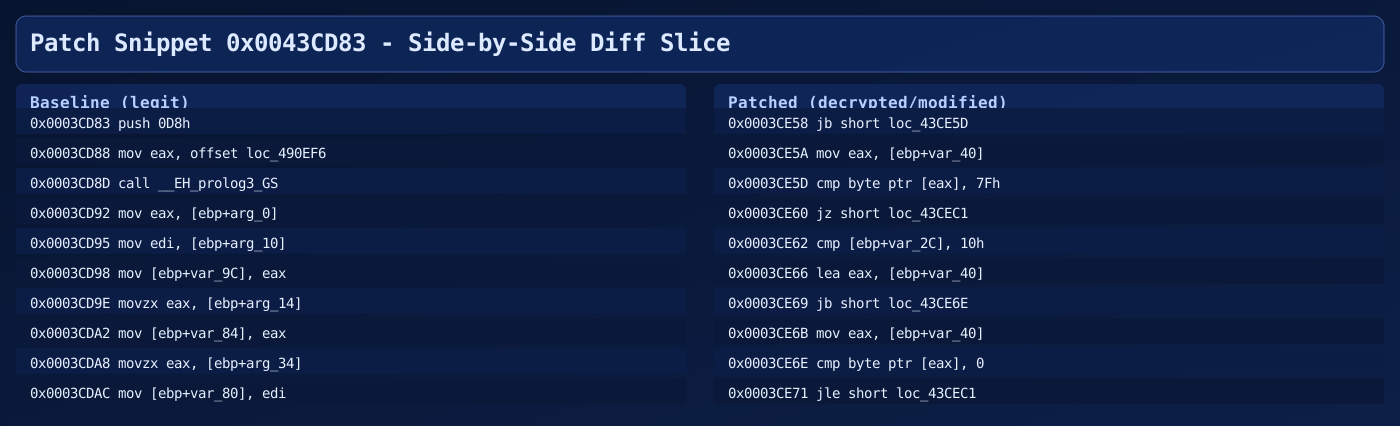
Target file: main_module_patched.exe | Patched subroutine offset: 0x0043CD83 | Evidence image: asm_G_patch_43CD83.png Match status: Unmatched at line level (same_line=True: 0/2632 rows in asm_side_by_side_0x0043CD83.csv).
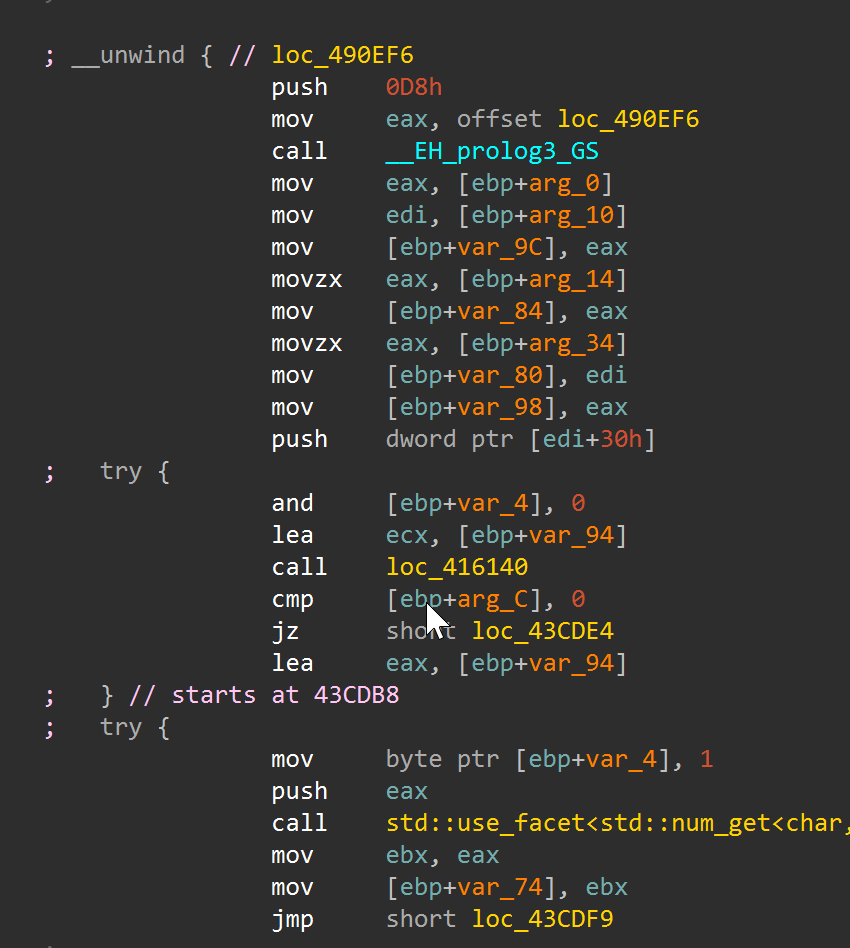 Direct IDA disassembly around
 0x43CD83, aligned with the focused side-by-side genetics slice above.
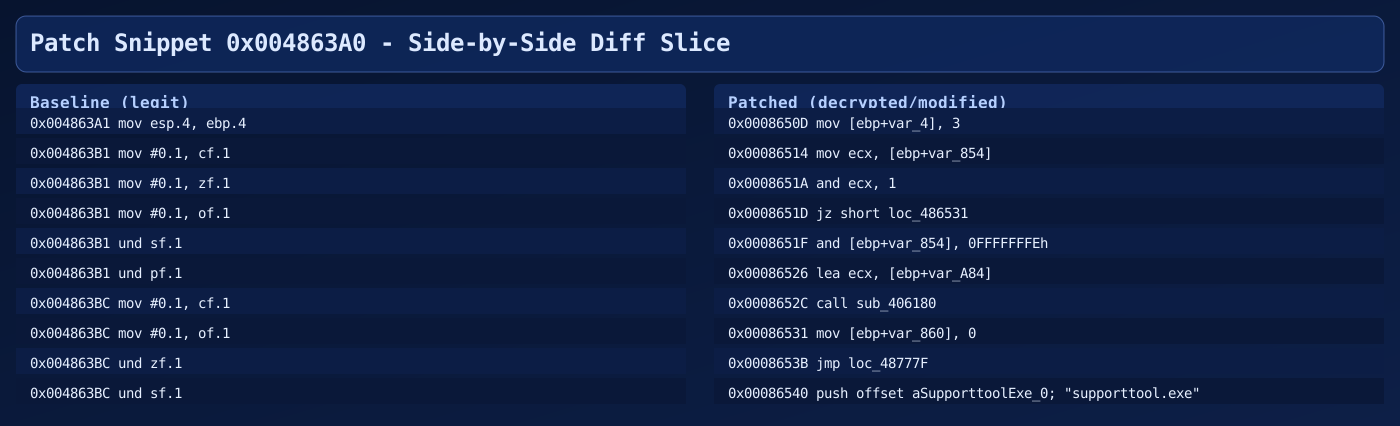
Target file: main_module_patched.exe | Patched subroutine offset: 0x004863A0 | Diff slice file: asm_side_by_side_0x004863A0.csv Match status: Unmatched at line level (same_line=True: 0/9452 rows in asm_side_by_side_0x004863A0.csv).
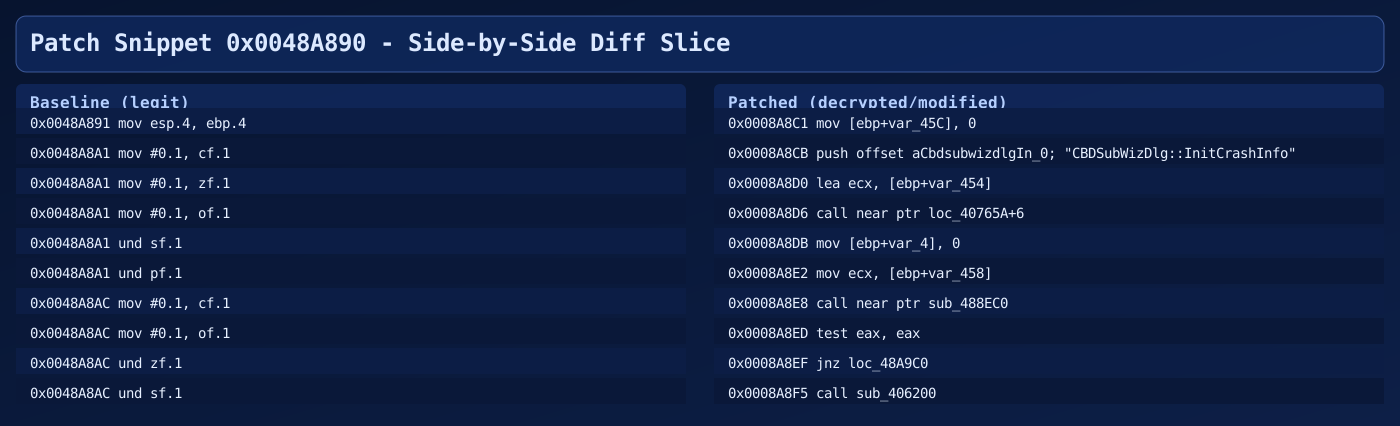
Target file: main_module_patched.exe | Patched subroutine offset: 0x0048A890 | Diff slice file: asm_side_by_side_0x0048A890.csv Match status: Unmatched at line level (same_line=True: 0/3599 rows in asm_side_by_side_0x0048A890.csv).
Partial-Match Candidates (Function-Level)
The diff dataset also contains function-level matches that are present in both binaries but modified. In the CSV outputs this is represented by classification=patched in patched_functions.csv (matched function identity, changed body).
| Target file | Patched subroutine offset | Function name (patched) | Function-level status | Notes |
|---|---|---|---|---|
main_module_patched.exe | 0x004863A0 | sub_4863A0 | Partial match (patched) | Large body rewrite (inst_count: 9452 -> 1856). |
main_module_patched.exe | 0x0048A890 | sub_48A890 | Partial match (patched) | SEH-heavy function with substantial instruction delta (3599 -> 742). |
main_module_patched.exe | 0x0043CD83 | sub_43CD83 | Partial match (patched) | Control-flow/handler block modified (2632 -> 521). |
main_module_patched.exe | 0x0048B6E0 | sub_48B6E0 | Partial match (patched) | Size unchanged but body changed heavily (2484 -> 526). |
Interpretation note:
- Function-level
patchedcan still appear line-level unmatched in focused slices when code has been heavily transformed or decompiler tokenization diverges.
Full raw diff sources used for these visuals:
asm_side_by_side_0x0043CD83.csvasm_side_by_side_0x004863A0.csvasm_side_by_side_0x0048A890.csvpatched_functions.csvpatched_diff.txtpatched_diff.json
What’s Next (If You Want Runtime Behavior)
At this point the workflow has already delivered most high-value static outcomes. The next decision is cost versus fidelity: deeper emulation is slower but self-contained, while VM detonation is higher fidelity but operationally heavier.
At this point you have:
- A decrypted PE-like module you can reverse statically.
- A decrypted config blob you can parse.
If you want to observe C2 protocol behavior safely, you still shouldn’t “run it for real” on your host. Options:
- Continue expanding the Unicorn stubs and emulate deeper (time-consuming).
- Use a Windows VM and detonate in an isolated sandbox (more faithful).
- Use targeted static lifting/decompilation for specific routines (best ROI for this sample family).
For most reverse engineering goals (IOCs, API usage, config extraction, control-flow understanding), the offline artifacts are already enough.
IOC Appendix
The following indicators of compromise are extracted from the analysis artifacts described in this report. All values are sample-specific unless otherwise noted.
File Hashes
| File | SHA-256 |
|---|---|
log.dll (malicious sideloaded DLL) | 3bdc4c0637591533f1d4198a72a33426c01f69bd2e15ceee547866f65e26b7ad |
BluetoothService.exe (sideload container) | 2da00de67720f5f13b17e9d985fe70f10f153da60c9ab1086fe58f069a156924 |
BluetoothService / encrypted_shellcode.bin (encrypted blob) | 77bfea78def679aa1117f569a35e8fd1542df21f7e00e27f192c907e61d63a2e |
shellcode.bin (stage1 dump) | 4416729d92e22ccb93e26c6896efe056b851a914727969f0ff604da4ef18ccfa |
shellcode_full.bin (full stage1 region) | 83f17d256d010ebfec8d58c4217f54a73d8237aa51ebab75c3e50f111d883d49 |
main_module_patched.exe (decrypted module) | bd0fb50084a21876fdbcf33fc7cf1949b78020f9e169086b2dd0b6aae28ad359 |
main_module_mem.bin (memory image) | 129a91eaa5e03b112ecfccd858b8c7fc4f482158a53d8300f2505d7c120f87d3 |
config_decrypted.bin (decrypted config) | aad018195c5ee6c2e3c00bc3c95313cb4301218534765472124ebc7b5fb7bcb1 |
Network IOCs
| Indicator | Type | Context |
|---|---|---|
api[.]skycloudcenter[.]com | C2 Domain | Extracted from decrypted RC4 config blob |
https://api[.]skycloudcenter[.]com/a/chat/s/{GUID} | C2 URL Pattern | Full C2 callback path from config |
Host-Based IOCs
| Indicator | Type | Context |
|---|---|---|
log.dll | Sideloaded DLL filename | Loaded by BluetoothService.exe via DLL sideloading |
BluetoothService.exe | Sideload host process | Renamed Bitdefender Submission Wizard used as loader container |
BluetoothService | Encrypted payload blob | Companion file read by LogInit export at runtime |
LogInit / LogWrite | DLL export names | Exports called by the sideload host to trigger loader and decrypt stages |
RC4 key qwhvb^435h&*7 | Cryptographic key | Used for config decryption at offset 0x30808, size 0x980 (sample-specific) |
XOR key gQ2JR&9; | Cryptographic key | Used for region byte-transform across 5 PE sections (sample-specific) |
| Chrome user-agent string | Config field | Present in decrypted config blob; used for C2 communication |
MITRE ATT&CK Mapping
The following techniques are derived from behaviors described in this analysis. Technique IDs map to the MITRE ATT&CK framework.
| Technique ID | Technique Name | Stage | Evidence in This Analysis |
|---|---|---|---|
| T1574.002 | Hijack Execution Flow: DLL Side-Loading | Stage 0 | BluetoothService.exe (renamed Bitdefender binary) sideloads log.dll from the same directory |
| T1059.006 | Command and Scripting Interpreter: Python | – | (Not observed in malware; used only by analysis tooling) |
| T1027 | Obfuscated Files or Information | Stage 0-1 | Encrypted shellcode blob (BluetoothService), loader-side runtime decrypt in LogWrite, region byte-transform with gQ2JR&9; key |
| T1140 | Deobfuscate/Decode Files or Information | Stage 1-2 | Multi-stage decryption: LCG-related shellcode decrypt, add/xor/sub region transform, RC4 config decrypt |
| T1620 | Reflective Code Loading | Stage 1-2 | Stage1 shellcode resolves APIs and reflectively loads decrypted main module without standard PE loader |
| T1106 | Native API | Stage 0-1 | Dynamic API resolution via FNV-1a + MurmurHash hashing in log.dll; PEB-walking hash resolver in main module |
| T1055.012 | Process Injection: Process Hollowing | Stage 0-1 | VirtualProtect marks 2MB region as PAGE_EXECUTE_READWRITE before stage1 handoff (memory permission manipulation for code execution) |
| T1497.001 | Virtualization/Sandbox Evasion: System Checks | Stage 1 | Exception-driven control flow (SEH/VEH), junk opcodes (in, out, retf), and anti-emulation patterns in stage1 |
| T1573.001 | Encrypted Channel: Symmetric Cryptography | Config | RC4-encrypted C2 configuration with sample-specific key; C2 URL pattern uses HTTPS |
| T1071.001 | Application Layer Protocol: Web Protocols | Config | C2 callback to https://api[.]skycloudcenter[.]com/a/chat/s/{GUID} with Chrome user-agent string |
| T1036.005 | Masquerading: Match Legitimate Name or Location | Stage 0 | Loader uses BluetoothService.exe (legitimate Bitdefender binary) and generic filenames (log.dll, BluetoothService) to blend with normal software |
Conclusion
This project demonstrates that the Chrysalis backdoor chain can be fully unpacked and validated through a reproducible offline workflow – no live Windows debugger required. The core strategy was deliberate: keep dynamic work narrow (only the stable LogWrite loader handoff where emulation is tractable), then convert every subsequent stage into explicit offline transforms with verifiable, hash-anchored outputs.
What this report establishes:
- Input-sample identity was verified through SHA-256 hashes aligned with the Rapid7-described cluster.
- Stage1 extraction at the
LogWriteboundary was repeatable and produced stable byte-identical artifacts. - Offline region transforms recovered a workable decrypted main-module view for static reversing.
- RC4 config recovery reproduced expected plaintext indicators, including the C2 URL path and UA context.
- Binary and database diff artifacts provide an auditable change trail for peer review and handoff.
What this workflow does not claim:
- It does not emulate full runtime behavior of all post-handoff stages.
- It does not replace controlled detonation for network/protocol behavior or timing-dependent actions.
- It does not assume every future variant reuses identical offsets, seeds, or transform metadata.
The broader significance here is methodological. Lotus Blossom is an established APT group, and Chrysalis represents a non-trivial multi-stage implant with layered encryption, exception-driven anti-analysis, and reflective loading. Showing that even this level of complexity can be reduced to a scriptable, auditable pipeline lowers the barrier for other analysts working on similar families. The same checkpoint-and-transform approach generalizes: identify the stable handoff boundary, extract deterministic bytes there, and push everything else into offline scripts that produce diffable artifacts.
If you adapt this method to a new sample, keep this order:
- Verify sample identity first (hashes and packaging context).
- Capture the cleanest possible handoff boundary artifact.
- Reconstruct later stages offline with explicit, testable transforms.
- Validate each stage with independent evidence (hashes, structural checks, diff reports).
The practical outcome is a workflow that is safer to rerun, easier to audit, and easier to share with other analysts who need reliable artifacts rather than one-off debugger traces.